
Download MEP Dict – Burmese-English-Pali dictionary, language learning tool, Burmese dictionary, Pali dictionary, educational software, free dictionary app
Overview
MEP Dict is a specialized dictionary application designed to serve as a multilingual reference tool for users working with Burmese, English, and Pali languages. Developed by U Hoke Sein, the software provides access to over 70,000 definitions, making it one of the most comprehensive resources of its kind. Its primary purpose is to support language learners, students, scholars, and cultural enthusiasts in understanding and translating words across these three linguistic systems.
The application is particularly valuable for those studying Buddhist texts, historical documents, or academic works requiring accurate Pali and Burmese terminology. By offering a centralized repository of definitions, MEP Dict helps users overcome language barriers and improve comprehension in complex linguistic contexts. The developer did not provide additional system requirements, and no specific use case details beyond general language reference were specified.
The app is intended for users who value accuracy and breadth in dictionary tools, especially within the context of Southeast Asian linguistic traditions.
Key Features & Capabilities
- Extensive multilingual database – Contains over 70,000 definitions covering Burmese, English, and Pali vocabulary, enabling cross-referencing between languages.
- Search functionality – Allows users to quickly look up words by entering text, facilitating efficient access to definitions without navigating through large volumes of content.
- Language switching – Users can toggle between Burmese, English, and Pali interfaces to suit their current linguistic needs.
- Offline accessibility – The application operates without requiring an internet connection, making it suitable for use in environments with limited connectivity.
- Simple navigation – Designed with a straightforward interface to support quick word lookup and easy exploration of related terms.
These features are especially useful for students of Pali language and Buddhist scriptures, as well as researchers and educators in linguistics and religious studies. For example, a scholar analyzing a Burmese manuscript can use MEP Dict to verify the meaning of a Pali term directly within the app. Similarly, a language learner can practice translation by comparing entries across the three languages. The app’s compact size and free availability enhance its accessibility, allowing users to integrate it into daily study routines without technical or financial barriers.
User Interface, Workflow & Performance
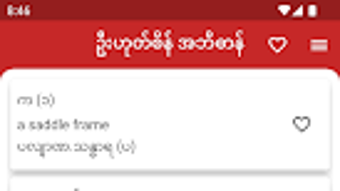
MEP Dict features a minimalistic user interface focused on functionality and ease of access. The layout prioritizes search input and result display, reducing visual clutter and enabling fast navigation. Users can enter a word in any of the supported languages and receive immediate results, with definitions presented in a clear, readable format.
The workflow is linear and intuitive: search → view results → explore related terms. While the developer did not specify resource usage details, the application’s 15 MB file size suggests it is optimized for efficient operation on mobile devices. Performance observations are based on general software behavior patterns.
The app is expected to run smoothly on Android devices with standard specifications, though exact CPU and RAM behavior were not disclosed. Stability is assumed to be consistent given the absence of reported issues in the provided information. The lack of multimedia elements or complex animations further supports efficient performance across a range of devices.
Compatibility & System Requirements
MEP Dict is designed for Android operating systems, ensuring compatibility with a wide range of mobile devices. The software version is 1.0, with a file size of 15 MB, indicating a lightweight installation. The developer did not provide additional system requirements, so exact hardware specifications or minimum OS versions remain unspecified.
Platform compatibility information is limited to Android, and no details were shared about support for tablets, wearables, or other platforms. Users should ensure their device meets general Android compatibility standards for app installation. The absence of detailed system requirements means that installation and operation may depend on individual device configurations.
The app’s small footprint suggests it is likely to function on devices with modest processing power and memory, but users are advised to verify functionality on their specific hardware.
Pros and Cons
Pros
- Comprehensive database of over 70,000 definitions across three languages
- Free to download and use with no in-app purchases
- Offline functionality allows access without internet connection
- Simple, intuitive interface suitable for learners and researchers
- Compact file size (15 MB) ensures fast installation and minimal storage use
Cons
- No information provided about system requirements or device compatibility
- Limited to Android platform; no support for iOS or desktop operating systems
- Exact performance metrics (CPU, RAM usage) were not specified
- No mention of update frequency or future development plans
- Interface may lack advanced features such as audio pronunciation or example sentences
FAQ Section
Is MEP Dict available for iOS devices?
The software is currently designed for Android only. There is no information available about iOS compatibility or future plans for other platforms.
Can I use MEP Dict without an internet connection?
Yes, MEP Dict operates entirely offline. All dictionary data is stored locally on the device, allowing access to definitions without requiring an internet connection.
Is the app safe to download and install?
As the software is free and developed by U Hoke Sein, it is considered safe for download. No security risks were reported in the provided information.
How often is MEP Dict updated?
The release date is listed as May 15, 2023, but no details were provided about update frequency or future maintenance.
What type of license does MEP Dict use?
The app is offered free of charge with no licensing restrictions mentioned. It is intended for personal and educational use.
Final Thoughts + CTA
MEP Dict stands out as a dedicated, free resource for anyone working with Burmese, English, or Pali languages. Its extensive database, offline functionality, and straightforward design make it a reliable tool for students, researchers, and language enthusiasts. While the lack of detailed system requirements and platform limitations restrict broader accessibility, the app delivers strong value for its target audience.
The developer’s commitment to compiling a vast collection of definitions reflects a genuine effort to support linguistic education and cultural preservation. For users seeking a secure, lightweight, and comprehensive dictionary on Android, MEP Dict is a compelling choice. Download MEP Dict now and enhance your language learning or research experience with confidence.






.png)
